
How To Make Your Business Profitable
Explore the full event overview, venue, schedule, panelists, and discussion options available before, during, and after the event.
How To Make Your Business Profitable
View event details, explore the schedule, and continue the discussion through the portal.
Review the event summary, venue, panelists, schedule, participation type, and discussion options, then choose whether to continue publicly or privately.
Completed
Current availability and publishing state of this event on the platform.
Paid
Participation type currently shown for this event listing.
2
Allocated panelists available for event communication and responses.
1 Day
Planned event duration based on the current event date range.
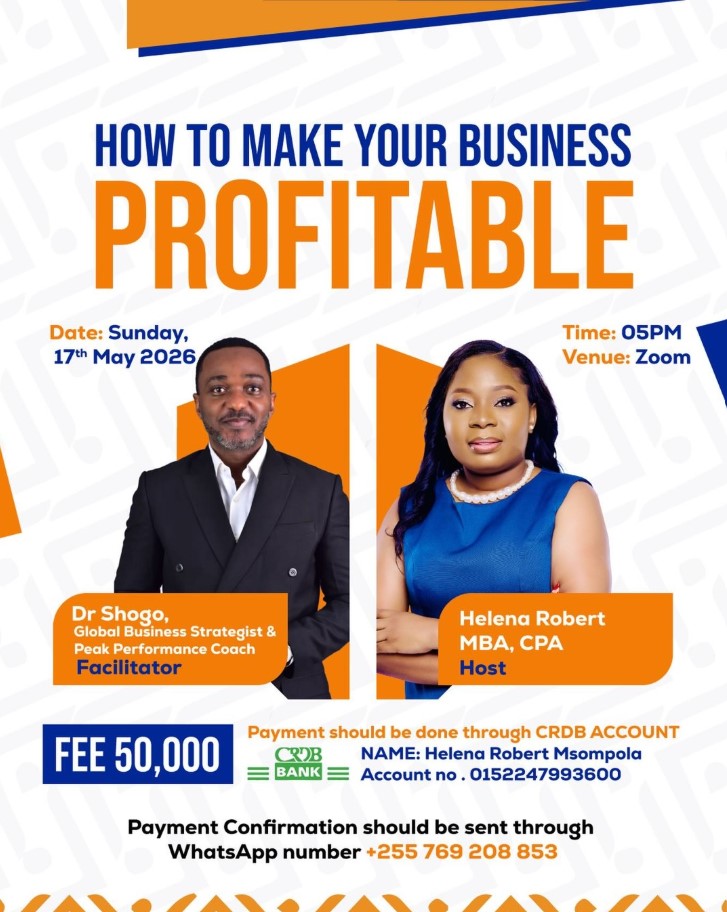
How To Make Your Business Profitable
About This Event
Ready to take your business to the next level? Success in business is not just about working hard it’s about working smart, making profitable decisions, and learning the right strategies from those who have done it successfully. This session is designed for entrepreneurs, business owners, and ambitious individuals who are ready to grow, increase profits, and build sustainable success.You will learn: Practical strategies to increase business profits, How to identify growth opportunities, Smart financial and business decisions and Proven insights to elevate your business. This is more than just a webinar, it’s an investment in your business future.
Support for Continued Communication
This page is not only for viewing event details. It also gives participants and panelists a shared space for questions, replies, follow-up discussion, and continued engagement when live session time is not enough.
Event Schedule
Planned timeline for the event and related session flow
Venue Map
Preview the listed location for this event
Allocated Panelists
Panelists attached to this event who may guide discussion, reply to participants, and share useful follow-up resources
Helena Robert
MBA, CPA
Dr. Shogo
Global Business Strategist & Peak Performance Coach
Participant Guidelines
Helpful notes for participants who want to continue communication beyond the live session
Frequently Asked Questions
Common concerns about participation, follow-up communication, privacy, and continued discussion
Is this page only for viewing event information?
No. It also helps participants continue communication through public questions, private questions, comments, and follow-up discussion.
Can panelists share helpful resources here?
Yes. Panelists can respond with explanations, useful links, references, keywords, and follow-up guidance after the live session.
Why are there public and private options?
Public communication supports shared discussion and open replies, while private communication helps participants contribute more comfortably when privacy matters.
How does this help when event time is limited?
The portal keeps communication open even after the session, so important questions, comments, and responses are not lost because of time limits.